
Clickjacking: When a click doesn’t mean what you think
In the world of web security, many attacks rely on complex exploits, vulnerable code or poorly configured systems, but clickjacking belongs to a very different category. Here, the attacker’s goal is not to break into a system, but to deliberately deceive the user.
In a well-executed clickjacking attack, the attacker tricks a user into performing an action that appears completely legitimate, yet is something the user never intended to do. Behind the scenes, the technique typically relies on a combination of a transparent layer and an iframe. The effectiveness of this method lies not primarily in the technology itself, but in the way human psychology works.
What is clickjacking?
Clickjacking is a web-based attack in which users are tricked into clicking a hidden or invisible interface element. In other words, while the user believes they are clicking on a button, image or link, an entirely different action is actually triggered.
The technique itself is surprisingly simple. First, the attacker loads a legitimate webpage into an iframe. This iframe is then made invisible using a transparent CSS layer, and the hidden interface is placed precisely underneath a seemingly harmless or appealing button.
Eventually, the unsuspecting user clicks, but not on what they think they clicked.
One of the key dangers of clickjacking is that the action is technically performed by the user. From the browser’s perspective, the click is a completely valid user interaction. As a result, systems often fail to detect clickjacking activity as malicious, allowing it to go unnoticed for long periods.
How does clickjacking work technically?
Clickjacking typically relies on three simple technical components.
1. iframe embedding
An iframe allows the content of one webpage to be embedded in another. This is a perfectly legitimate web development technique. The problem begins when this capability is used for manipulation.
2. Transparent layer
The attacker turns the iframe into a transparent layer using CSS. For example
- opacity: 0,
- position: absolute,
- precise pixel positioning.
This creates an invisible interface element from the user’s perspective.
3. Click manipulation
The transparent layer is placed directly underneath an attractive UI element. Typical examples include:
- “Click here to win a prize”
- “Start the video”
- “Download your free gift”
The user clicks on what appears to be a normal element, but in reality, an action is triggered on a different webpage.
Example scenario
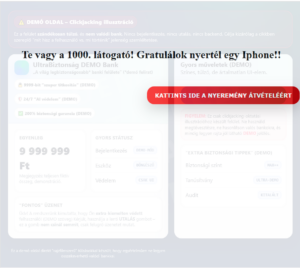
Below is a simulation of a multi-layered clickjacking attack. In this example, the user encounters a message frequently used in real-world attacks:
“Congratulations! Win an iPhone – click here!”
For someone unfamiliar with web security, such an offer can appear tempting. However, the user does not realise that, in the background, the attacker loads another webpage via a transparent layer, potentially triggering a sensitive action, such as initiating a bank transfer.
What can happen after such a click?
If the webpage loaded in the background allows sensitive actions to be triggered with a single click, serious consequences may follow. For example
- enabling a permission,
- activating a service without consent,
- modifying account settings,
- subscribing the user to a service or mailing list,
- approving a payment transaction.
Because the action occurs within the user’s active session and appears to result from the user’s own interaction, the system typically records it as a legitimate request. For this reason, clickjacking often does not appear in logs as a traditional attack.
Why is clickjacking dangerous in corporate environments?
Organisations often focus on technical vulnerabilities such as flawed code, misconfigurations or missing patches. Clickjacking, however, is an attack that manipulates user interaction.
This can become particularly problematic in systems where administrative interfaces are accessible via a browser, internal applications rely on session-based authentication, and sensitive operations can be executed with a single click.
If an application does not protect itself against embedding, an attacker may manipulate user interactions via an external webpage.
How can organisations defend against it?
Fortunately, effective defence mechanisms against clickjacking are well known.
-
X-Frame-Options HTTP header
One of the simplest protections. Example: X-Frame-Options: DENY. This prevents the webpage from being embedded in an iframe.
-
Content Security Policy: frame-ancestors directive
A modern, more flexible solution is the Content Security Policy (CSP). Example: Content-Security-Policy: frame-ancestors ‘self’. This allows administrators to define precisely which domains are permitted to embed the page.
-
SameSite cookie settings
SameSite cookie policies can reduce certain types of session-related abuse.
-
Multi-step confirmation
For sensitive operations, it is advisable to introduce additional safeguards, such as confirmation dialogues, secondary confirmation steps and re-authentication before critical actions.
Technology alone is not enough
During ethical hacking assessments, we often find that technical protection alone is insufficient. Many attacks rely heavily on manipulating human behaviour.
This is why one of the most effective ways to improve security is to test organisations using realistic attack simulations.
At Whiteshield, we regularly conduct security awareness and resilience assessments that simulate real attack techniques. These include phishing simulations – measuring click rates, response behaviour and providing educational feedback – as well as clickjacking simulations, which test how users interact with manipulated interfaces and help identify organisational risks.
Such tests help both employees and decision-makers understand the important reality that security depends not only on systems, but also on how people behave at the screen.
If you would like to understand how resilient your organisation is against manipulation-based attacks, we can test both your systems and your users using realistic attack scenarios. Contact us to learn more!

